
Microsoft Agent 365 went GA on May 1, 2026. If you’re the person who gets paged when something in M365 breaks, this one’s for you.
I’ll skip the keynote summary. Here’s what changed in your tenant, where to click, what licenses you actually need, and what’s going to break first.
What showed up in your admin center
Open the Microsoft 365 admin center. You now have:
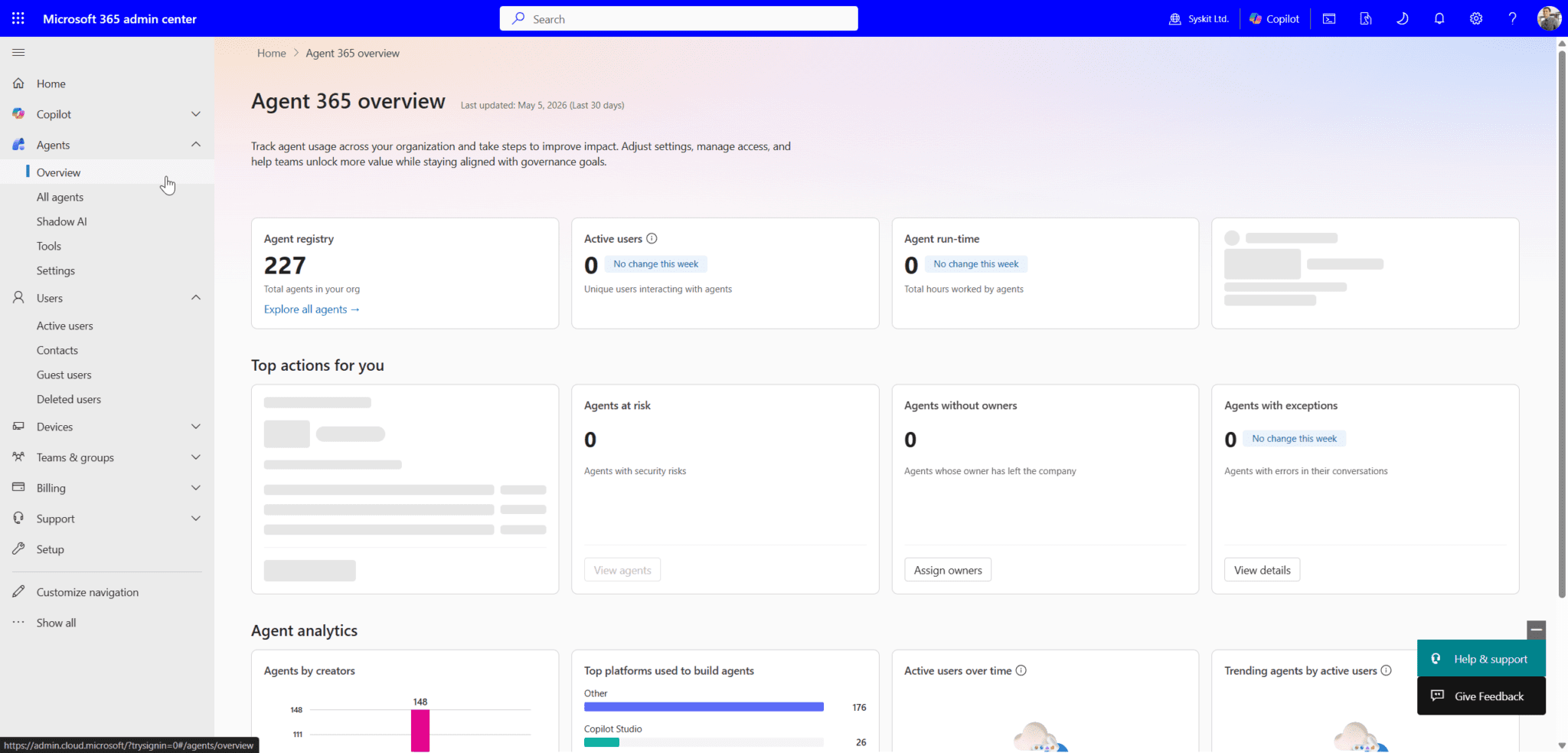
- Agent Registry under the Copilot section. Single inventory of every registered agent in the tenant: Copilot Studio, Foundry, M365 Agents Toolkit, Agent Framework, ecosystem partners (Adobe, SAP, Zendesk, Manus), and any custom registrations.
- Shadow AI page. Discovers local agents on Windows endpoints via Defender and Intune signals. Starts with OpenClaw detection. GitHub Copilot CLI and Claude Code coverage on the roadmap.
- Copilot > Settings > Copilot Frontier. This is where Frontier preview access toggles live. If you don’t want preview features bleeding into production, set this to “No access” today.
Agents now appear as first-class objects in Entra. They get an identity, they show up in audit logs, and Conditional Access can target them.
The licensing reality, with the gotchas
$15 per user per month standalone. $99 per user per month bundled into Microsoft 365 E7. Per user.
A few things admins need to know that aren’t on the marketing page:
- No prerequisite license is required to buy Agent 365. But the security capabilities you actually want depend on user-side licensing.
- Conditional Access for OBO agents is evaluated against the user’s identity token. The user needs M365 E3 (or equivalent CA licensing) for CA to apply to their agents.
- Identity Protection for OBO agents requires the user to have M365 E5 (or equivalent).
- Identity Governance for OBO agents requires the user to have Identity Governance standalone or Entra Suite. Without it, there’s no delegation relationship to govern.
- Label-based DLP for agent-grounded data requires the data to be labeled, which typically means M365 E3+ (or Purview PAYG for non-M365 data).
- Agent 365 does not grant E5-level Purview or Defender capabilities at the user level. If you’re on E3, you stay on E3. The license buys agent-specific functionality, not a general security upgrade.
- No agent count limit. A licensed user can have one agent or a thousand.
- Foundry and Copilot Studio cost the same. No premium for either platform when registering OBO agents.
- EU Data Boundary alignment is confirmed for E7 and Agent 365 — relevant if you’re a European admin.
One licensing change to flag because it bit a lot of community tooling last week: pulling agent inventory through the Microsoft Graph Agent and App Package Management API behavior changed at GA. If you have PowerShell scripts or community tools (mine included, the Agent Registry Tool from the Syskit whitepaper) running against that endpoint, expect licensing-related errors and check whether the calling identity needs Agent 365 assigned. Test before your next scheduled run.
What’s GA vs preview, and why it matters for change control
If you write change tickets, this is the section to bookmark.
GA on May 1:
- Agent Registry and lifecycle management
- Entra identity for OBO agents (agents acting on behalf of a licensed user)
- Conditional Access targeting agents
- Purview DLP, sensitivity labels, and audit on agent activity
- Defender threat detection for agents
- Intune Shadow AI discovery on Windows (OpenClaw baseline)
- Standalone licensing and E7 bundle, commercial and education tenants
Public preview at GA:
- Autonomous “agentic users” with their own identity, mailbox, OneDrive
- Agent 365 SDK
- Security posture management for Foundry and Copilot Studio agents
- Agent 365 tools gateway (runtime threat protection)
- Windows 365 for Agents Cloud PC class
- Multicloud registry sync with AWS Bedrock and Google Gemini Enterprise
Not yet:
- GCC: late 2026
- GCC High: late 2026
- DoD: early 2027
If your tenant is GCC or above, you’re on the sidelines until at least Q4. Plan accordingly and don’t let leadership assume parity.
The discovery pass you should run this week
Don’t wait for a project plan. Run this in a maintenance window:
- Open the Shadow AI page. Note the count of detected local agents. If you see OpenClaw on machines you didn’t expect, those endpoints had no agent governance until last week.
- Pull the Agent Registry export. Filter by registration source. Anything with no clear owner is your first cleanup target.
- Check Entra sign-in logs filtered to agent identities. You’re looking for agents authenticating from unexpected IPs, off-hours patterns, or against resources outside their declared scope.
- Audit Copilot Studio publishers. Anyone with maker rights has been able to publish agents into the tenant. Cross-reference with HR. You will find agents owned by people who left.
- Check Purview audit for agent activity over the last 30 days. Sensitive label hits, DLP near-misses, downloads. The history is there now whether you were watching or not.
Block out a day. You’ll need it.
Conditional Access policies to write first
Don’t try to govern everything on day one. Three policies cover most of the immediate risk:
- Block unmanaged local agents on managed devices. Intune compliance + Conditional Access targeting agent sign-ins. OpenClaw and similar tools running locally without registration get blocked at auth.
- Require named locations for high-privilege agents. Any agent with access to Finance, HR, or Legal data only authenticates from corporate IP ranges or trusted networks.
- Session controls on agent access to sensitive sites. Force Purview session policies for agents touching labeled content. Stops bulk download patterns before they finish.
Test in report-only mode for at least a week. Agents fail differently than users and the failures are noisier.
Owners, not just policies
The platform makes inventory and policy enforcement possible. It does not solve ownership. Every registered agent needs an accountable human, and the platform won’t pick one for you. Decide now:
- Does ownership default to the publisher, the requester, or a central AI ops team?
- What happens to agents when their owner leaves? (Spoiler: you need an offboarding step for this.)
- Who approves new agent registrations? Not “who can,” but who is accountable when one misbehaves.
Write this down before your first incident. The platform gives you a kill switch. It doesn’t tell you who’s allowed to pull it.
The bottom line for admins
The inventory is solid, the Entra integration is solid, the Intune shadow AI story is the surprise hit. The autonomous agent story and the SDK are still preview, so don’t promise features you don’t have yet.
Run discovery this week. Write your first three CA policies next week. Talk to your security team about the Defender tuning. And get ownership defined before someone audits you for it.
